Answer your apps and agents from anywhere
AckPush is one inbox for the questions your apps and AI agents need you to answer. They send a message; it reaches your phone as a notification with buttons, and the web inbox. You answer with one tap, a reply or a snooze, and the app gets the answer right away.
How it works
- Answer once, done everywhere. Answering on one device clears the message on the others.
- Buttons, replies and snoozes. A message can offer up to 3 actions: buttons (Approve, Deny…), a typed reply, or “remind me later”.
- The app hears back. Through a signed webhook, or by waiting on the message.
Get started
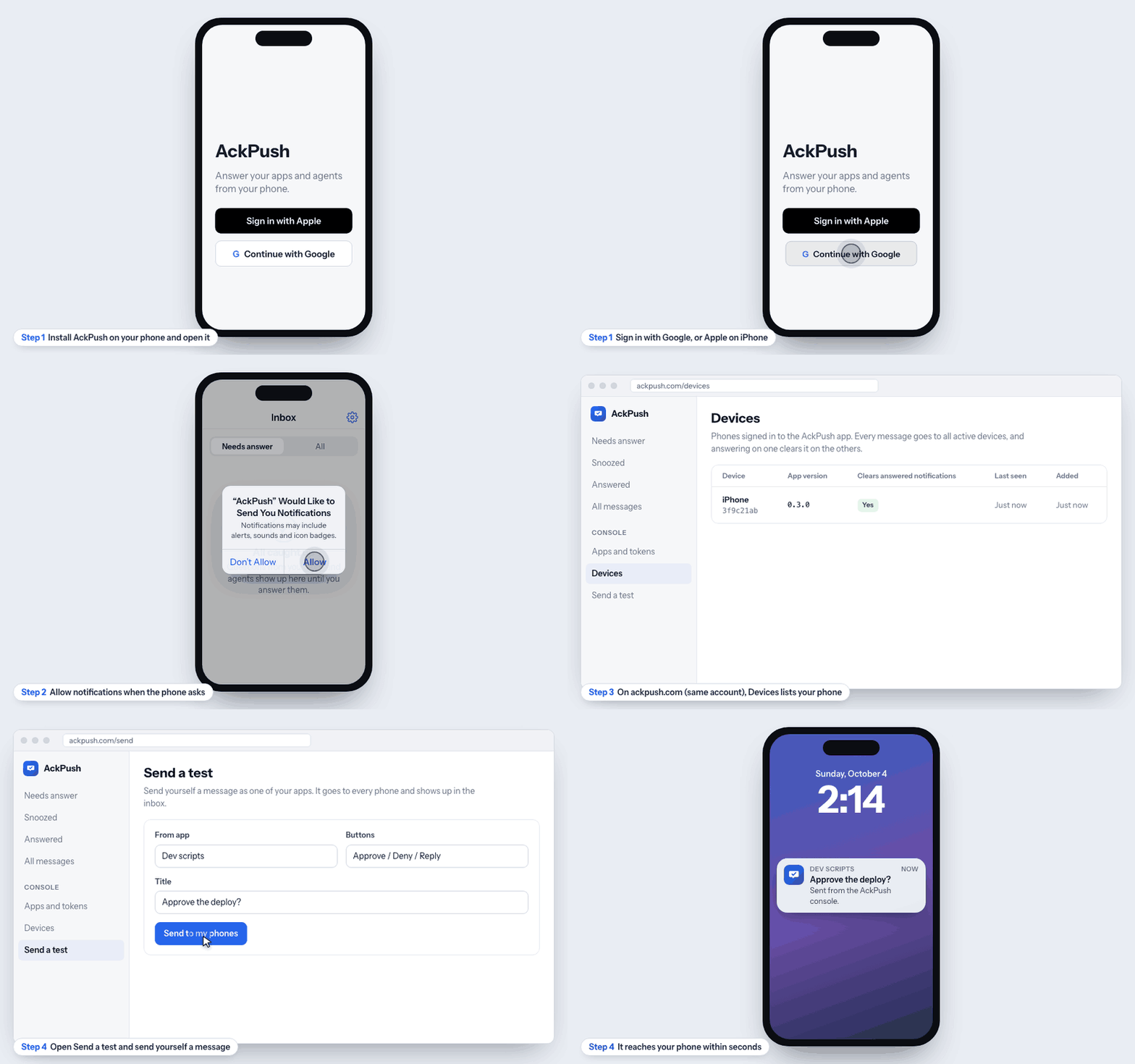
- Install the AckPush app on your phone (iPhone or Android). AckPush is invite-only for now: request an invite and the install link comes from the AckPush team.
- Sign in with Google (or Apple on iPhone) and allow notifications when the phone asks. The app registers your phone automatically.
- Sign in on the web at ackpush.com with the same account. Check Devices: your phone should be listed with a recent “Last seen”.
- Send yourself a test from Send a test. It should reach your phone in a few seconds; answer it there or on the web.
Answer messages
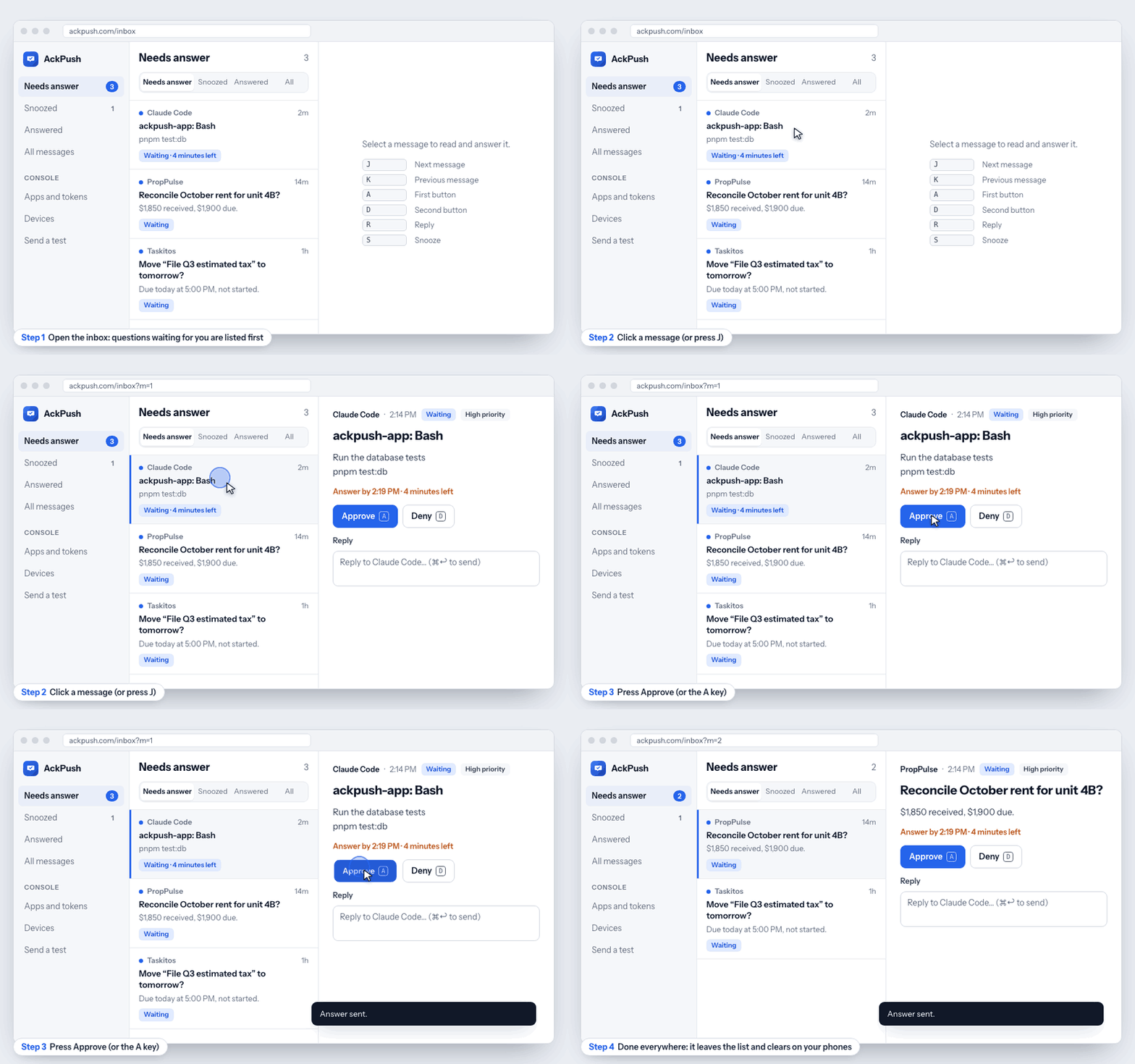
Three ways to answer
- From the notification: tap a button, or choose Reply and type. No need to open the app.
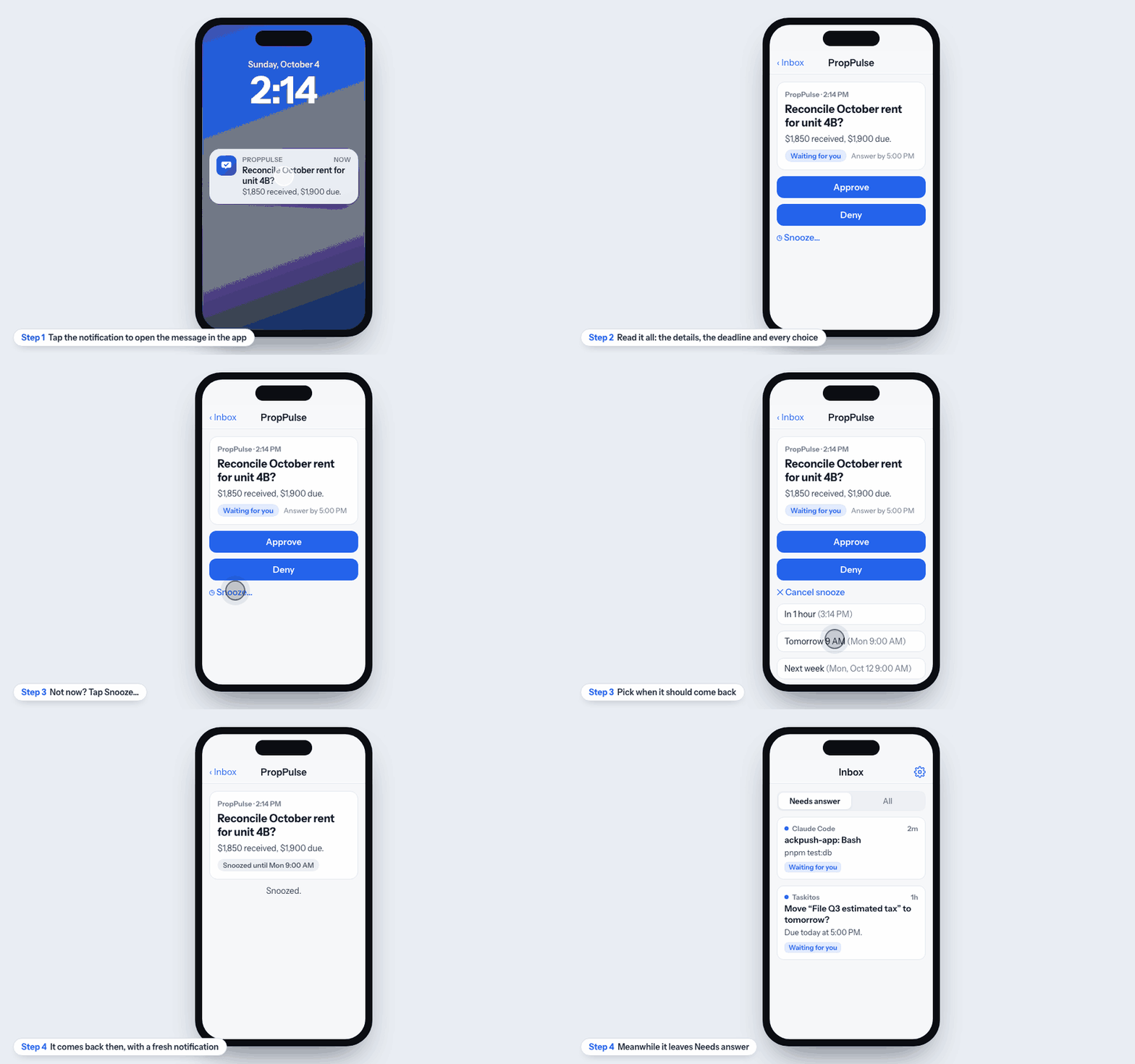
- In the phone app: tap the notification (or open AckPush) to see the message, its deadline and all its actions.
- On the web: the inbox updates live. Needs answer lists questions still waiting; Snoozed, Answered and All show the rest.
On your phone
- From the notification: press and hold it (iPhone) or expand it (Android), then tap a button. On a locked iPhone, Approve asks for Face ID or your passcode first; Deny, No and Decline show in red.
- Reply in your own words: tap Reply, type, and tap Send. The app or agent gets your text.
- Open it: tap the notification to see the whole message, its deadline and every choice. Needs answer lists what is still waiting; All shows everything.
- Not now: in the message, tap Snooze… and pick In 1 hour, Tomorrow 9 AM or Next week. It leaves Needs answer and comes back with a fresh notification.
Keyboard shortcuts (web)
| J / K | Next / previous message |
| A | Press the first button (usually Approve) |
| D | Press the second button (usually Deny) |
| R | Write a reply (⌘↩ or Ctrl+↩ sends it) |
| S | Snooze: in 1 or 3 hours, tomorrow 9 AM, next Monday, or a time you pick |
| Esc | Close the snooze menu, then the message |
Connect an app
Anything that can make an HTTPS request can send you messages: a server, a script, a cron job, an AI agent.
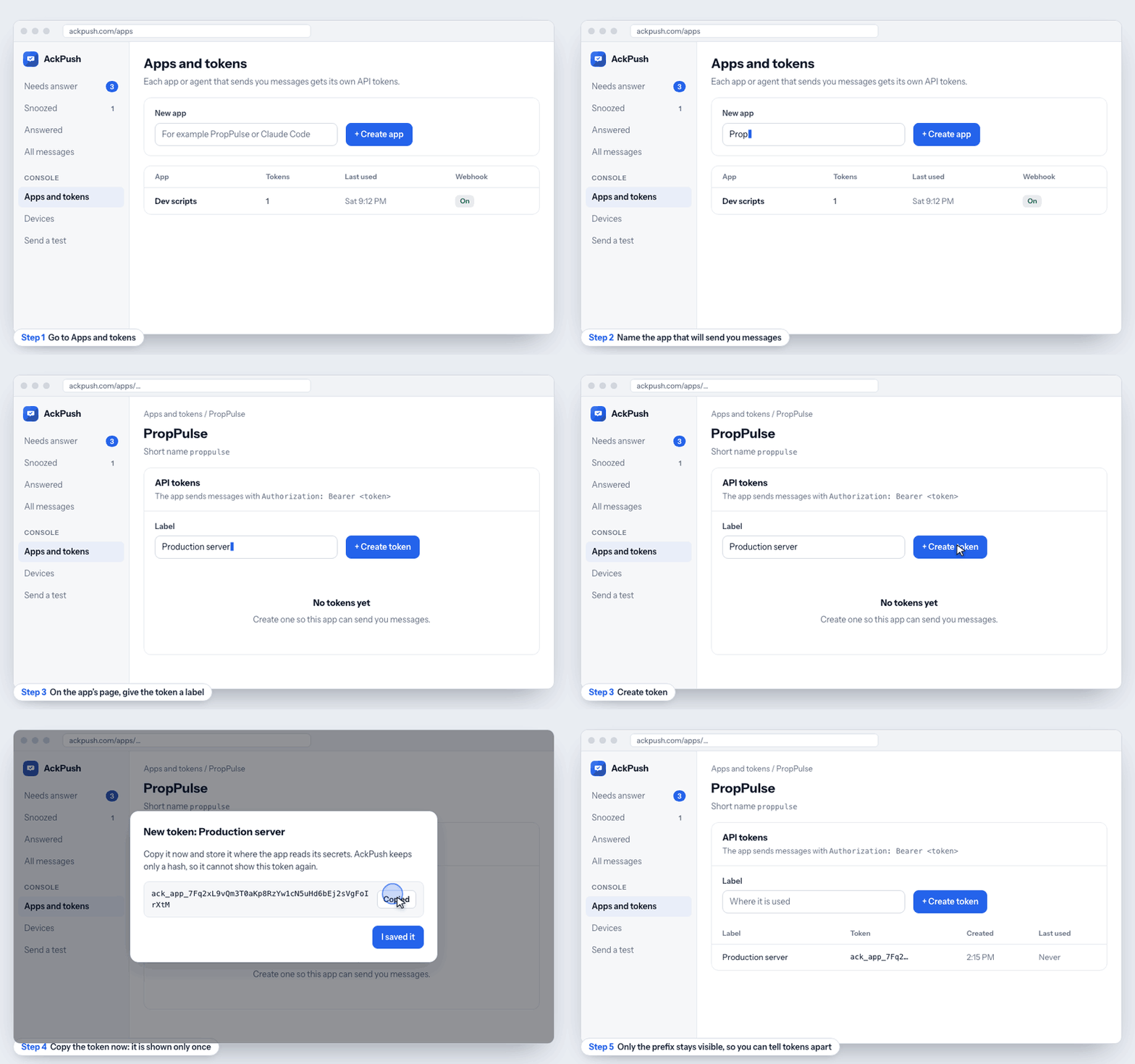
- Open Apps and tokens and create an app with the name you want to see on notifications (for example “PropPulse”).
- On the app’s page, create a token with a label that says where it is used. Copy it right away: AckPush stores only a hash and cannot show it again. Lost it? Revoke it and create another.
- Store the token where the app keeps its secrets (an environment variable such as
ACKPUSH_TOKEN), never in source code. - Send your first message:
curl -X POST https://ackpush.com/v1/messages \
  -H "Authorization: Bearer $ACKPUSH_TOKEN" \
  -H "Content-Type: application/json" \
  -d '{
    "title": "Reconcile October rent for 4B?",
    "body": "$1,850 received, $1,900 due.",
    "actions": [
      {"key": "approve", "label": "Approve"},
      {"key": "deny", "label": "Deny"},
      {"key": "note", "label": "Reply", "kind": "reply"}
    ]
  }'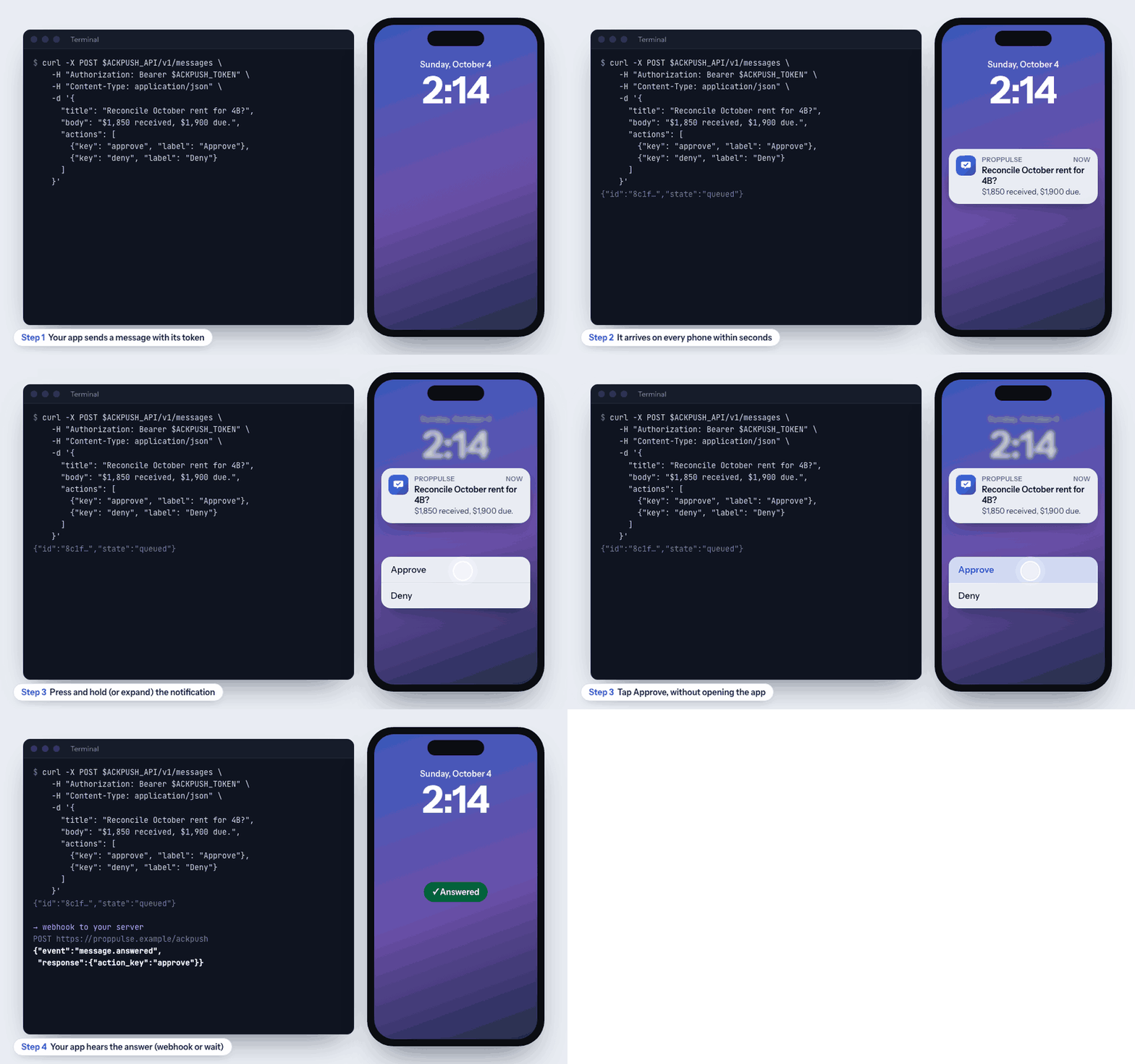
The response is {"id": "…", "state": "queued"}. Keep the id: it is how you get the answer. All fields are in the message reference.
Get the answer back
Option 1: webhook (best for servers)
- On the app’s page in Apps and tokens, enter your endpoint (it must start with
https://) and choose Turn on webhook. - Copy the signing secret (shown once) into your server’s secrets.
- AckPush POSTs JSON to your endpoint when a message is
answered,snoozed,expiredorfailed. Reply with any 2xx status; failures are retried with backoff and listed under the app’s recent deliveries.
{
  "event": "message.answered",
  "occurred_at": "2026-10-04T19:14:07Z",
  "message": { "id": "8c1f…", "state": "answered", "title": "Reconcile October rent for 4B?", "metadata": {} },
  "response": { "action_key": "approve", "text": null, "channel": "app_action", "responded_at": "2026-10-04T19:14:07Z" }
}
Every request carries AckPush-Signature: t=<unix time>,v1=<HMAC-SHA256(secret, "t.body")>. Check it before trusting the body:
import crypto from 'node:crypto';

// header: the AckPush-Signature value, e.g. "t=1791141247,v1=5f2c…"
// rawBody: the request body exactly as received (a string, not parsed JSON)
export function verifyAckPush(header, rawBody, secret) {
  const parts = Object.fromEntries(header.split(',').map((p) => p.split('=')));
  const expected = crypto.createHmac('sha256', secret).update(`${parts.t}.${rawBody}`).digest('hex');
  const fresh = Math.abs(Date.now() / 1000 - Number(parts.t)) < 300; // 5 minutes
  return fresh && crypto.timingSafeEqual(Buffer.from(expected), Buffer.from(parts.v1 ?? ''));
}
Option 2: wait for it (best for scripts and agents)
Call wait with the message id. It returns as soon as you answer, or after timeout seconds (up to 55) with the current state; call it again to keep waiting.
curl "https://ackpush.com/v1/messages/MESSAGE_ID/wait?timeout=55" \
  -H "Authorization: Bearer $ACKPUSH_TOKEN"
Example: act on each button
A webhook lets your server do something different for each answer. This example is a small Python receiver you deploy on Modal, which gives it a public https:// address, so nothing runs on your computer. It reacts to the button you pressed, and a page at the same address lists the last 20 webhooks with their JSON.
| You answer | The receiver |
|---|---|
| Approve | ✅ Starts the deploy (pretend). |
| Deny | ⛔ Cancels the deploy (pretend). |
| Reply “ship it after lunch” | 💬 Saves your text. |
The actions are placeholders: replace the body of react() with your own code, such as starting a job, creating a document or calling another API. The receiver also checks the signature, ignores a delivery it has already handled (the same webhook can arrive twice), and answers with 200 straight away.
def react(payload: dict) -> str:
    """Your logic goes here: what to do for each answer."""
    answer = payload.get("response") or {}
    title = (payload.get("message") or {}).get("title", "")
    if payload.get("event") != "message.answered":
        return f"{payload.get('event')}: nothing to do"
    if answer.get("action_key") == "approve":
        return f'✅ Approved, so the deploy for "{title}" started'
    if answer.get("action_key") == "deny":
        return f'⛔ Denied, so the deploy for "{title}" was cancelled'
    if answer.get("text"):
        return f'💬 Reply saved: "{answer["text"]}"'
    return f'Button "{answer.get("action_key")}" pressed'
Deploy it
- Install Modal, sign in, and download the example:
pip install modal
python3 -m modal setup
curl -fsSL https://ackpush.com/examples/ackpush-webhook-modal.py -o app.py- Create its secret with a placeholder, then deploy. Until you replace the placeholder in step 4, the receiver refuses every request. The deploy prints the address, ending in
.modal.run.
python3 -m modal secret create ackpush-webhook ACKPUSH_WEBHOOK_SECRET=pending
python3 -m modal deploy app.py- In Apps and tokens, open your app, paste that address under Webhook and choose Turn on webhook. Copy the signing secret (shown once).
- Replace the placeholder with the signing secret (paste it when asked), then stop and deploy again so the new secret is used:
printf 'Signing secret: '; stty -echo; read -r S; stty echo; echo
python3 -m modal secret create --force ackpush-webhook ACKPUSH_WEBHOOK_SECRET="$S"; unset S
python3 -m modal app stop ackpush-webhook-demo   # running copies keep the old secret
python3 -m modal deploy app.py- Open the address in a browser. Send a message with Approve, Deny and Reply buttons to that app (see Connect an app) and answer it on your phone: a card appears within a few seconds.
python3 -m modal app stop ackpush-webhook-demo.Claude Code: approve from your phone
When Claude Code needs permission to run a command or edit a file, the AckPush hook sends the request to your phone instead of waiting in the terminal.
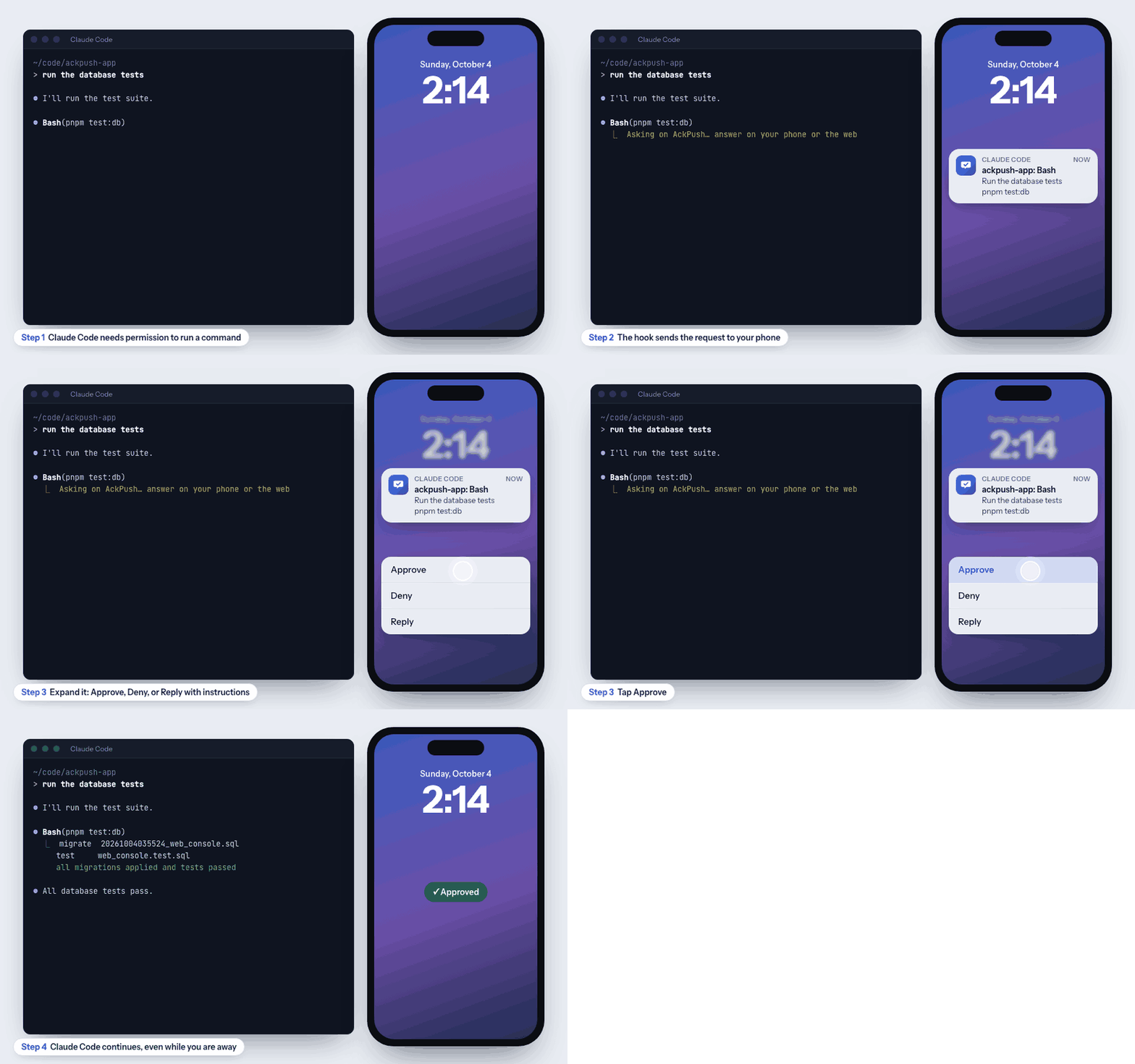
| You answer | Claude Code |
|---|---|
| Approve | Runs the tool. |
| Deny | Does not run it, and is told you said no. |
| Reply “use the staging database instead” | Does not run it, and follows your reply as the new instruction. |
| No answer in 5 minutes | Shows the normal prompt in the terminal; the phone message is withdrawn. |
Set it up
- In Apps and tokens, create an app named Claude Code and a token for it. Copy the token.
- Save the token where the hook looks for it:
mkdir -p ~/.config/ackpush
pbpaste > ~/.config/ackpush/claude-code-token   # macOS: paste the token you copied
chmod 600 ~/.config/ackpush/claude-code-token- Download the hook (a small Node.js script with no dependencies; it needs Node 18 or newer):
curl -fsSL https://ackpush.com/hook/ackpush-permission-hook.mjs \
-o ~/.config/ackpush/ackpush-permission-hook.mjs- Add the hook to Claude Code’s settings. Use
~/.claude/settings.jsonfor every project, or.claude/settings.local.jsoninside one project to try it there first. If the file already has a"hooks"section, addPermissionRequestto it.
{
  "hooks": {
    "PermissionRequest": [
      {
        "matcher": "*",
        "hooks": [
          {
            "type": "command",
            "command": "node ~/.config/ackpush/ackpush-permission-hook.mjs",
            "timeout": 360
          }
        ]
      }
    ]
  }
}- Start a new Claude Code session (settings are read when a session starts) and ask for something that needs permission, such as running your tests.
ACKPUSH_DISABLED=1 claude. To wait longer than 5 minutes, set ACKPUSH_WAIT_SECONDS (keep it below the hook’s timeout).Claude Code: notify and ask
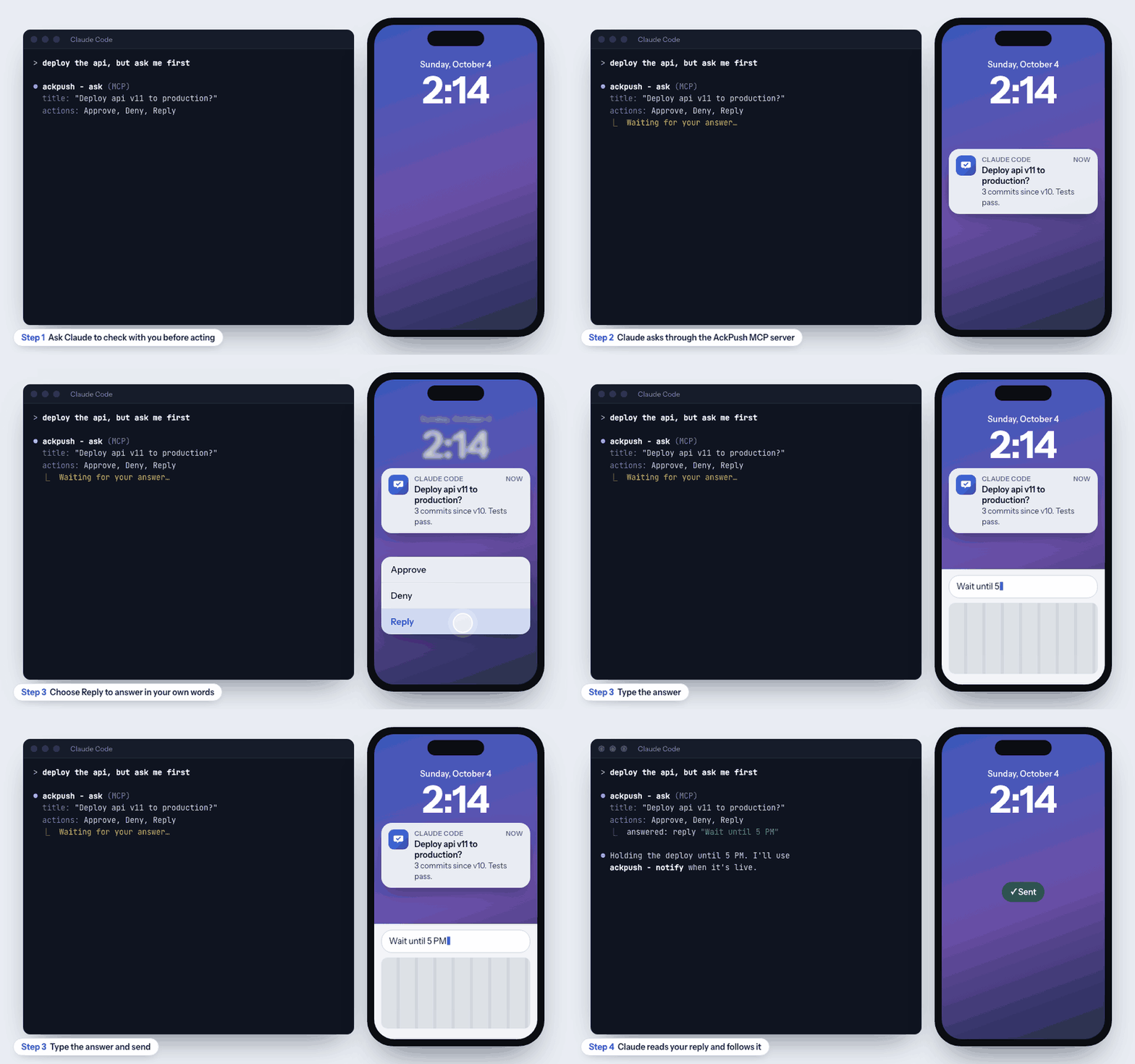
The AckPush MCP server lets Claude message you on its own: a heads-up when a long job finishes, or a question before it does something important.
claude.ai, Claude Desktop and ChatGPT
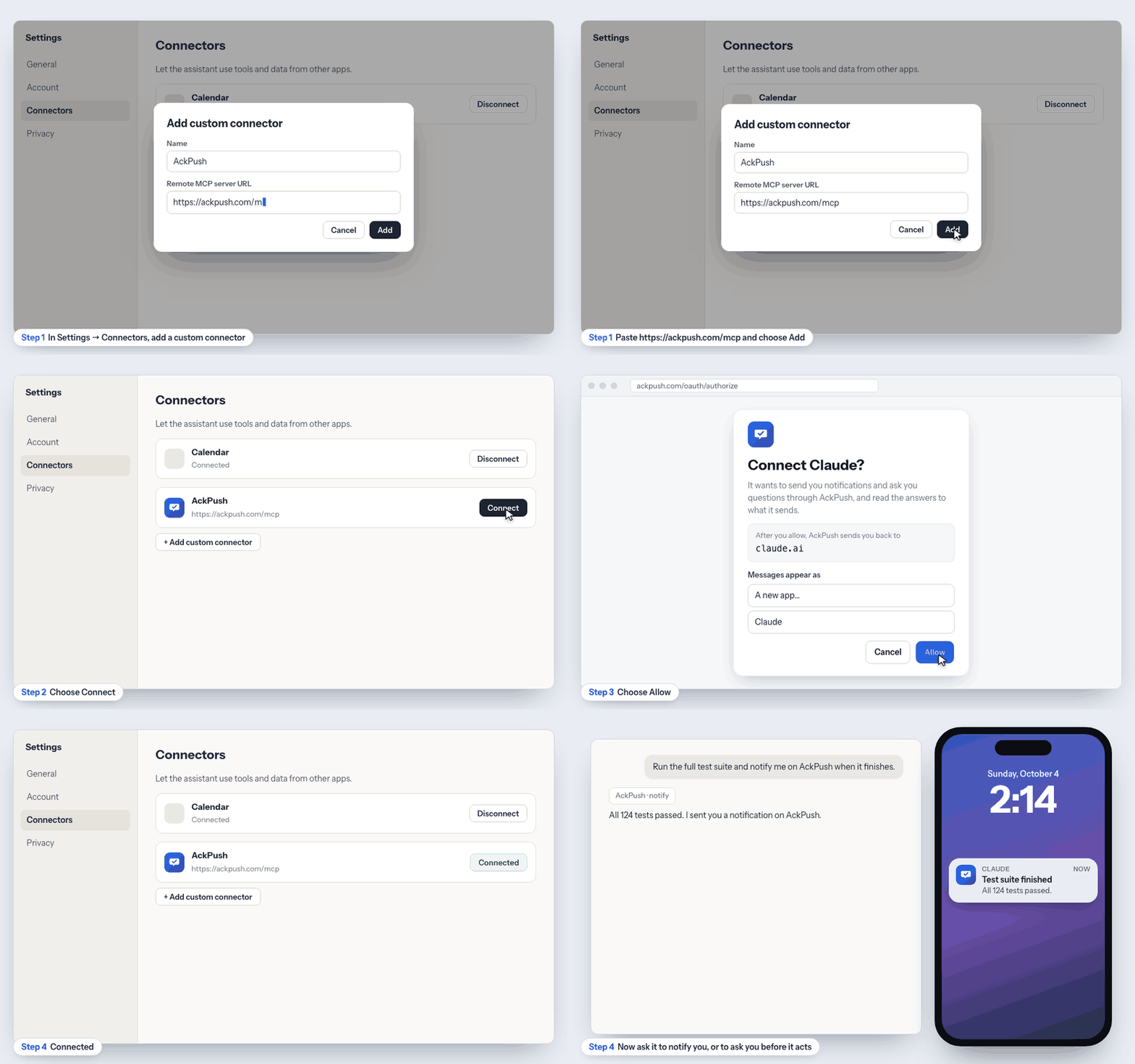
- Add a custom connector (in Claude: Settings → Connectors → Add custom connector; in ChatGPT: Settings → Connectors) with this URL:
https://ackpush.com/mcp- Choose Connect. AckPush opens: sign in with the same account as your phone, pick the app the messages should appear as (for example a new app named “Claude”), and choose Allow.
- Back in the chat, ask Claude to notify you or to ask you something (examples below).
Claude Code
- Add the server; Claude Code opens the same AckPush sign-in in your browser the first time:
claude mcp add --scope user --transport http ackpush https://ackpush.com/mcp- Check it with
claude mcp list(it should say Connected), then try one of the prompts below.
claude mcp add --scope user --transport http ackpush \
  https://ackpush.com/mcp \
  --header "Authorization: Bearer $(cat ~/.config/ackpush/claude-code-token)"
To disconnect a signed-in client, open its app in Apps and tokens and revoke its OAuth token (or delete the app).
Your own buttons
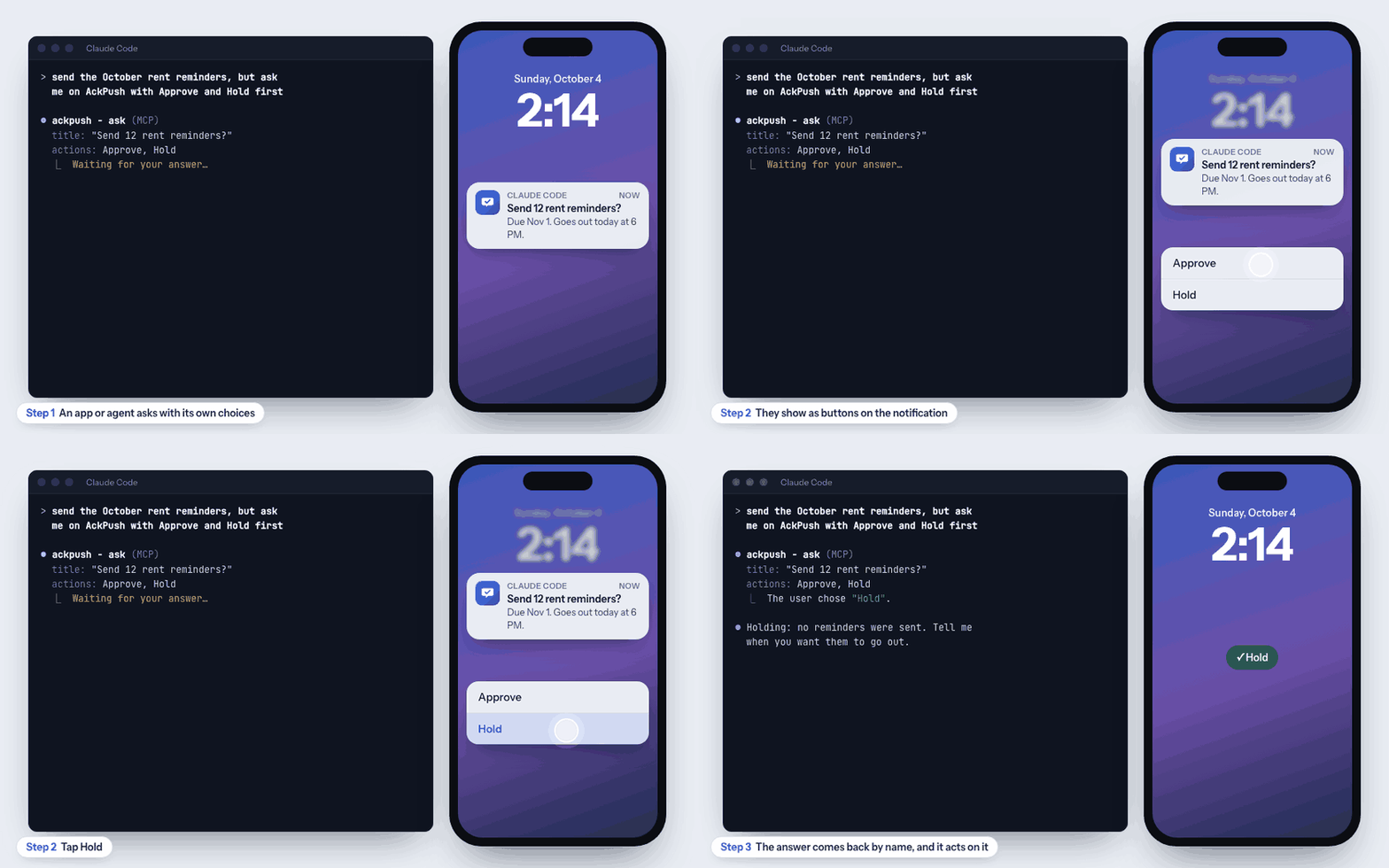
Ask for the choices you want, and they show as buttons. The answer comes back by name (for example The user chose “Hold”.), so Claude can act on it.
Things to ask
- “Run the full test suite and notify me on AckPush when it finishes.”
- “Prepare the release, then ask me on AckPush before you push the tag.”
- “Ask me on AckPush with Approve and Hold buttons before you send the rent reminders.”
- “Remind me on AckPush tomorrow at 9 AM to review the PR.”
| Tool | What it does |
|---|---|
notify | A notification with no answer needed; can be scheduled for later. |
ask | A question with Approve / Deny / Reply, or up to 3 choices of its own (such as Approve / Hold); waits up to about 45 seconds for the answer. Approve / Hold, Yes / No and Accept / Decline (optionally with Reply) are buttons on the notification on every phone; other choices are buttons on Android and show in the app and the inbox. |
wait_for_reply | Keeps waiting for an answer that has not come yet. |
get_message | Checks a message’s state and answer without waiting. |
Message reference
POST https://ackpush.com/v1/messages with Authorization: Bearer <token>. Only title is required.
| Field | Type | What it does |
|---|---|---|
title | text, 1–200 | The headline on the lock screen. |
body | text, up to 4000 | Details; the notification shows the start. |
actions | list, up to 3 | Each { key, label, kind? }. kind is button (default), reply (typed answer) or snooze (with snooze_seconds, 60 to 30 days). key: lowercase letters, digits, _. |
priority | -2 to 2 | Negative is quiet; 1 and 2 mark it important. Default 0. |
url | http(s) URL | A link shown with the message (“Open link”). |
send_at | ISO time | Deliver later instead of now (a reminder). |
expires_at | ISO time | Deadline to answer; after it the message expires and the webhook says so. |
dedupe_key | text | While a message with this key is open, sending it again returns that message instead of notifying twice. |
thread_key | text | Groups related messages. |
metadata | object | Anything you want back in the webhook. |
Also available with the same token: GET /v1/messages/{id} (state and answer), /wait, and POST /v1/messages/{id}/snooze, /reschedule, /cancel.
Troubleshooting
- Messages do not reach my phone
- Check that notifications are allowed for AckPush in the phone’s settings, then open the app once so it registers. Devices should show the phone with a recent “Last seen”. Send a test to check.
- An answered message stays on my iPhone
- iOS sometimes delays or skips the silent “clear” push (low battery, Low Power Mode, or the app was swiped away). Opening AckPush clears everything that was answered elsewhere.
- The app returns 401
- The token is missing, mistyped or revoked. Send it as
Authorization: Bearer ack_app_…, or create a new one. - Sign-in on the web does not finish
- Use the same Google account as on your phone. AckPush is invite-only, so other accounts are refused: request an invite.
- Claude Code still asks in the terminal
- Start a new session after changing settings. Check that
~/.config/ackpush/claude-code-tokenexists, thatACKPUSH_DISABLEDis not set, and thatnode --versionis 18 or newer. With no answer in 5 minutes, the terminal prompt is expected. - Webhook deliveries fail
- The app’s page lists recent deliveries with the last error. The endpoint must be HTTPS, respond within a few seconds with a 2xx status, and check the signature with the current secret.